前言

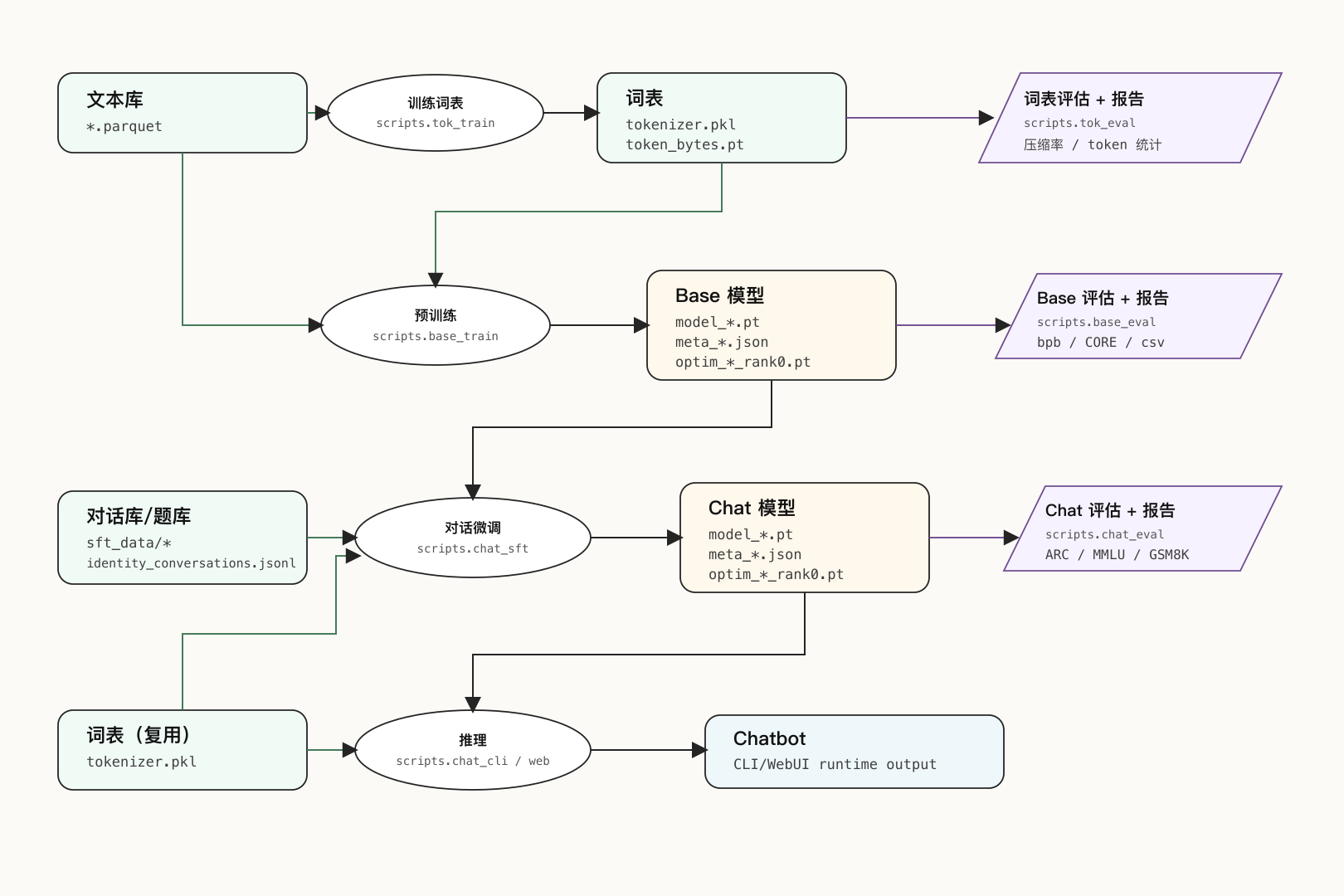
nanochat_artifact_flow_preview
本文核心目标是理解大模型Chat应用端到端的全流程,并不是“训练出来一个多强的模型”。

开始,我们只有一些散落的文本
最后,我们会得到一个傻乎乎的聊天机器人


分词

下载预训练数据集

dataset.py,数据从Hugging Face下载, 默认要下载的数量是MAX_SHARD = 6542,方便起见,我为了一晚上能训练完,只下载了50个。

1
2
3
4
5
6
7
ian@Ian-Gao-PC:~/.cache/nanochat/base_data_climbmix$ find . -maxdepth 1 -type f -printf '%f %s bytes\n' | sort
shard_00000.parquet 92291918 bytes
shard_00001.parquet 92124317 bytes
...
shard_00039.parquet 91480777 bytes
shard_00040.parquet 91501658 bytes
shard_06542.parquet 91699537 bytes

文件的内容大概是这样的清理过的文本,取前两行:

1
2
3
4
5
row[0]:
{"text": "Ruby Sparx Biography/Wiki, Age, Height, Career, Photos & More\nWhat you're experiencing at the beginning of the cycle is higher pressure caused by the angle of the wheel.\nWe currently have 3 ProSharp machines, and an older triple head BladeMaster.\nDo you have diamond wheels on them now?? There's a point where you aren't so high that it cuts out, but you're still too high in that a smooth continuous pass doesn't occur, instead the ring chatters and changes pitch sound along the length of the runner.\nThe fact that it is not out of alignment is surprising.\nRuby Sparks Movie Review\nListen to the pass any chatter? I thought there was only a height adjustment and that wouldn'tchange the actual pressure.\n\nQuestion: What is the name of the older machine mentioned? Answer: BladeMaster"}

row[1]:
{"text": "|Manufacturer||Société des Ateliers d'Aviation Louis Bréguet|\n|Primary Role||Light Bomber|\nContributor: Alan Chanter\nww2dbaseAlmost certainly built in larger numbers than any other warplane type in the period between the world wars, the Bre.19 was designed as asuccessor to the Bre.14 that had performed so magnificently in World War I. A two seat biplane that employed a substantial amount of aluminium alloy in its structure, the Bre.19 demonstrated the measure of progress that had been made in aircraft development since the end of the war (it weighed the same as it Breguet predecessor but could carry a payload that was up to 80 per cent greater). The Bre.19 was developed to be either an observation and reconnaissance aircraft (in its A.2 version) or a day bomber (in its B.2 version). The prototype, which first appeared in public at the Paris Salon de l’Aéronautique, was initially fitted with the experimental Brequet-Bugatti 16-cylinder engine, but was subsequently fitted with the 450-hp Renault 12Kb 12 cylinder Vee with which the type made its maiden flight in March 1922.\nww2dbaseProduction commenced in 1923 and by 1927 some 2,000 Bre.19s (equally divided betwee

使用的脚本如下

1
2
3
4
5
6
7
8
9
10
11
12
13
14
15
16
17
18
19
20
21
22
23
24
25
26
(nanochat) ian@Ian-Gao-PC:~/Github/nanochat$ python - <<'PY'
import json
import pyarrow.parquet as pq

p = "/home/ian/.cache/nanochat/base_data_climbmix/shard_00016.parquet"
pf = pq.ParquetFile(p)
print("file:", p)
print("rows:", pf.metadata.num_rows)
print("row_groups:", pf.num_row_groups)
print("schema:")
print(pf.schema)

rows = pf.read_row_group(0).slice(0, 2).to_pylist()
for i, row in enumerate(rows):
print(f"\nrow[{i}]:")
print(json.dumps(row, ensure_ascii=False)[:1200])
PY

file: /home/ian/.cache/nanochat/base_data_climbmix/shard_00016.parquet
rows: 84992
row_groups: 83
schema:
<pyarrow._parquet.ParquetSchema object at 0x7f0d41c431c0>
required group field_id=-1 schema {
optional binary field_id=-1 text (String);
}

tokenizer训练

tok_train.py 脚本

  • 使用parquets_iter_batched方法批量读取shard文件
  • 使用RustBPETokenizer.train_from_iterator来训练Tokenizer
  • 得到的tokenizer.pkl,内容可以理解为分词规则+分词词典
  • 得到的token_bytes.pt是优化计算的缓存。
    tokenizer 在后续预训练、SFT、eval、CLI都会用到.

CPU 100%、GPU 不动、约 40 秒结束

1
2
3
4
5
6
(nanochat) ian@Ian-Gao-PC:~/.cache/nanochat/tokenizer$ ll
total 544
drwxr-xr-x 2 ian ian 4096 May 24 20:36 ./
drwxr-xr-x 11 ian ian 4096 May 26 11:49 ../
-rw-r--r-- 1 ian ian 132649 May 24 20:36 token_bytes.pt
-rw-r--r-- 1 ian ian 412105 May 24 20:36 tokenizer.pkl

在脚本中可以使用get_tokenizer获取分词器来encode或者decode。如下代码是使用示例。

1
2
3
4
5
6
7
8
9
10
11
12
13
14
15
16
17
18
19
20
21
22
23
24
25
26
27
(nanochat) ian@Ian-Gao-PC:~/Github/nanochat$ python - <<'PY'
import os
from nanochat.tokenizer import get_tokenizer

base = "/home/ian/.cache/nanochat/tokenizer"
for name in ["tokenizer.pkl", "token_bytes.pt"]:
p = os.path.join(base, name)
print(name, os.path.getsize(p), "bytes")

tok = get_tokenizer()
print("vocab_size:", tok.get_vocab_size())
print("special_tokens:", sorted(tok.get_special_tokens()))

text = "Hello nanochat! Hello world!"
ids = tok.encode(text)
print("text:", text)
print("ids:", ids)
print("decoded:", tok.decode(ids))
PY

tokenizer.pkl 412105 bytes
token_bytes.pt 132649 bytes
vocab_size: 32768
special_tokens: ['<|assistant_end|>', '<|assistant_start|>', '<|bos|>', '<|output_end|>', '<|output_start|>', '<|python_end|>', '<|python_start|>', '<|user_end|>', '<|user_start|>']
text: Hello nanochat! Hello world!
ids: [14051, 4324, 4918, 265, 33, 28820, 987, 33]
decoded: Hello nanochat! Hello world!

预训练

预训练基座模型

base_train.py, 会使用到:

  • tokenizer:在121行加载
  • data shard:在331行读取

做了一些粗略的参数分析,smoke训练,为了能一晚上训练完,使用depth=12max_seq_len=512device_batch_size=8total_batch_size=65536进行预训练,最终 step 20160 完成。

(事后回顾这里的取舍,当时是优先节省显存和时间,max_seq_len=512的设定比较保守,仓促,也许可以设置更大再跑)

训练速度约 41k-42k tok/sec,总训练时间约 516 分钟,峰值显存约 4.5 GB

最终结果每2000步都会有一个checkpint,其中

  • model_*.pt:就是模型本体,主要就是神经网络的参数矩阵
  • meta_*.json:保存配置/指标/训练状态,推理也需要用
  • optim_*_rank0.pt: 大概内容是“训练历史+接下来怎么训练”,主要用于继续训练
1
2
3
4
5
6
7
8
9
10
11
12
13
14
15
16
17
18
19
(nanochat) ian@Ian-Gao-PC:~/.cache/nanochat/base_checkpoints/d12_overnight$ ll
total 21902724
drwxr-xr-x 2 ian ian 4096 May 25 08:17 ./
drwxr-xr-x 5 ian ian 4096 May 25 00:26 ../

-rw-r--r-- 1 ian ian 1350 May 25 00:26 meta_002000.json
...
-rw-r--r-- 1 ian ian 1351 May 25 08:13 meta_020000.json
-rw-r--r-- 1 ian ian 1352 May 25 08:17 meta_020160.json

-rw-r--r-- 1 ian ian 792763319 May 25 00:26 model_002000.pt
...
-rw-r--r-- 1 ian ian 792763319 May 25 08:13 model_020000.pt
-rw-r--r-- 1 ian ian 792763319 May 25 08:17 model_020160.pt

-rw-r--r-- 1 ian ian 1246166965 May 25 00:26 optim_002000_rank0.pt
...
-rw-r--r-- 1 ian ian 1246166965 May 25 08:13 optim_020000_rank0.pt
-rw-r--r-- 1 ian ian 1246166965 May 25 08:17 optim_020160_rank0.pt

评估基座模型

base_eval.py,只评估模型预测下一个token的能力,产出的文件在两个地方:

1
2
3
4
5
6
7
8
9
(nanochat) ian@Ian-Gao-PC:~/.cache/nanochat/base_eval$ ll
total 12
drwxr-xr-x 2 ian ian 4096 May 25 17:45 ./
drwxr-xr-x 11 ian ian 4096 May 26 11:49 ../
-rw-r--r-- 1 ian ian 1440 May 25 17:36 base_model_020160.csv

(nanochat) ian@Ian-Gao-PC:~/.cache/nanochat/report$ ll | grep 'base-model-eval'
-rw-r--r-- 1 ian ian 6277 May 25 17:36 base-model-evaluation.md
(nanochat) ian@Ian-Gao-PC:~/.cache/nanochat/report$

文件内容简单解释一下:

  • Accuracy是原始正确率,Centered是扣掉随机/基线后的归一化分数
  • 最后的 CORE metric 就是把这些任务的 centered 分数综合成一个总分。
  • 比如arc_easy Accuracy=0.656250表示ARC-Easy题目里大约 65.6% 答对;它的Centered=0.541667表示扣掉选择题随机猜中的基线后,表现还不错。
  • arc_challenge Accuracy=0.218750Centered=-0.041667,说明这类更难题上表现比随机基线还略差一点。

除了其他单项的指标,综合的指标主要看这两个:

  • CORE metric: 0.1543 可以说是很低了(kaparthy的榜单上是0.26左右)
  • val bpb: 0.8950 越小越好(kaparthy的榜单上是0.7左右)
1
2
3
4
5
6
7
8
9
10
11
12
13
14
15
16
17
18
19
20
21
22
23
24
25
26
27
28
29
30
31
32
33
34
35
36
37
38
39
40
41
42
43
44
45
46
47
48
49
50
51
52
(nanochat) ian@Ian-Gao-PC:~/.cache/nanochat/report$ sed -n '1,20p' /home/ian/.cache/nanochat/base_eval/base_model_020160.csv
Task , Accuracy , Centered
hellaswag_zeroshot , 0.531250 , 0.375000
jeopardy , 0.031250 , 0.031250
bigbench_qa_wikidata , 0.406250 , 0.406250
arc_easy , 0.656250 , 0.541667
arc_challenge , 0.218750 , -0.041667
copa , 0.562500 , 0.125000
commonsense_qa , 0.312500 , 0.140625
piqa , 0.750000 , 0.500000
openbook_qa , 0.375000 , 0.166667
lambada_openai , 0.375000 , 0.375000
hellaswag , 0.468750 , 0.291667
winograd , 0.437500 , -0.125000
winogrande , 0.468750 , -0.062500
bigbench_dyck_languages , 0.031250 , 0.031250
agi_eval_lsat_ar , 0.187500 , -0.015625
bigbench_cs_algorithms , 0.375000 , 0.375000
bigbench_operators , 0.093750 , 0.093750
bigbench_repeat_copy_logic , 0.000000 , 0.000000
squad , 0.000000 , 0.000000
(nanochat) ian@Ian-Gao-PC:~/.cache/nanochat/report$ sed -n '1,29p' /home/ian/.cache/nanochat/report/base-model-evaluation.md
---
## Base model evaluation
timestamp: 2026-05-19 17:36:32

- model: base_model (step 20160)
- CORE metric: 0.1543
- train bpb: 0.8337
- val bpb: 0.8950
- hellaswag_zeroshot: 0.3750
- jeopardy: 0.0312
- bigbench_qa_wikidata: 0.4062
- arc_easy: 0.5417
- arc_challenge: -0.0417
- copa: 0.1250
- commonsense_qa: 0.1406
- piqa: 0.5000
- openbook_qa: 0.1667
- lambada_openai: 0.3750
- hellaswag: 0.2917
- winograd: -0.1250
- winogrande: -0.0625
- bigbench_dyck_languages: 0.0312
- agi_eval_lsat_ar: -0.0156
- bigbench_cs_algorithms: 0.3750
- bigbench_operators: 0.0938
- bigbench_repeat_copy_logic: 0.0000
- squad: 0.0000
- coqa: 0.0938
- boolq: -0.1513
- bigbench_language_identification: 0.2437

后训练

下载SFT数据

在跑chat_sft.py的时候,会下载数据,SmolTalk/MMLU/GSM8K/CustomJSON都在tasks目录下,国内网络问题很烦,提前下好了数据,是gpt5.5帮忙解决的。

这些数据都在这个目录下,identity_conversations下载到了外面

1
2
3
4
5
6
7
8
9
10
(nanochat) ian@Ian-Gao-PC:~/.cache/nanochat/sft_data$ ll
total 20
drwxr-xr-x 5 ian ian 4096 May 25 22:18 ./
drwxr-xr-x 11 ian ian 4096 May 26 11:49 ../
drwxr-xr-x 3 ian ian 4096 May 25 22:18 gsm8k/
drwxr-xr-x 3 ian ian 4096 May 25 22:08 mmlu/
drwxr-xr-x 3 ian ian 4096 May 25 22:17 smol-smoltalk/
(nanochat) ian@Ian-Gao-PC:~/.cache/nanochat$ ll | grep 'conversations'
-rw-r--r-- 1 ian ian 2511848 May 24 21:44 identity_conversations.jsonl
(nanochat) ian@Ian-Gao-PC:~/.cache/nanochat$

这些数据大概都“长什么样”呢

  • SmolTalk:聊天/改写/问答,user/assistant的对话格式
1
2
3
4
5
6
7
8
9
10
11
12
13
{
"messages": [
{
"role": "user",
"content": "Please rewrite this sentence to sound more professional: I can't come to the meeting because I'm busy."
},
{
"role": "assistant",
"content": "I am unable to attend the meeting due to a scheduling conflict."
}
],
"source": "smol-smoltalk"
}
  • MMLU:选择题
1
2
3
4
5
6
{
"question": "The cyclic subgroup of Z_24 generated by 18 has order",
"subject": "abstract_algebra",
"choices": ["4", "8", "12", "6"],
"answer": 0
}
  • GSM8K:数学应用题
1
2
3
4
{
"question": "Natalia sold 48 clips in April, and half as many in May. How many clips did she sell altogether?",
"answer": "Natalia sold 48/2 = 24 clips in May.\nNatalia sold 48+24 = 72 clips altogether.\n#### 72"
}
  • identity_conversations.jsonl:身份对话
1
2
3
4
5
6
7
8
9
10
11
12
13
14
15
16
17
18
[
{
"role": "user",
"content": "Are you ChatGPT?"
},
{
"role": "assistant",
"content": "I am nanochat, an open-source language model project created for learning how LLMs are trained end to end."
},
{
"role": "user",
"content": "What are you trained to do?"
},
{
"role": "assistant",
"content": "I am trained to understand user messages and generate helpful assistant-style responses."
}
]

SFT 监督微调

本阶段就是要跑chat_sft.py脚本,这里遇到了不少的问题。

1. HuggingFace限流

HuggingFace报错429,下载限流问题,先编写脚本减小并发量,增加重试次数,下载到本地。然后修改脚本中的数据来源,不是从 HuggingFace 下载,而是从本地 parquet 文件读取。

2. torch.compile卡住

torch.compile其作用是为了长训练提速,对于段时间训练,可以权衡不开启,修改了脚本,增加了关闭参数,暂时关闭。

3. loss会NAN

由于基座模型的参数改变了,直接训练loss会NAN,对以下参数进行了调整:

  • max_seq_len=2048: 基座模型使用的是512,但是 SFT 的数据有很多都超过了这个长度。如果还是用512,模型还是学不会这个对话的格式,因此调成了2048。
  • device_batch_size=8: 沿用基座模型,GPU压力能承受。
  • total_batch_size=16384: device_batch_size * max_seq_len = 8 * 2048 = 16384tokens,这样计算下来grad_accum_steps=1, 每轮forward/backward都更新参数,训练反馈快,适合实验。

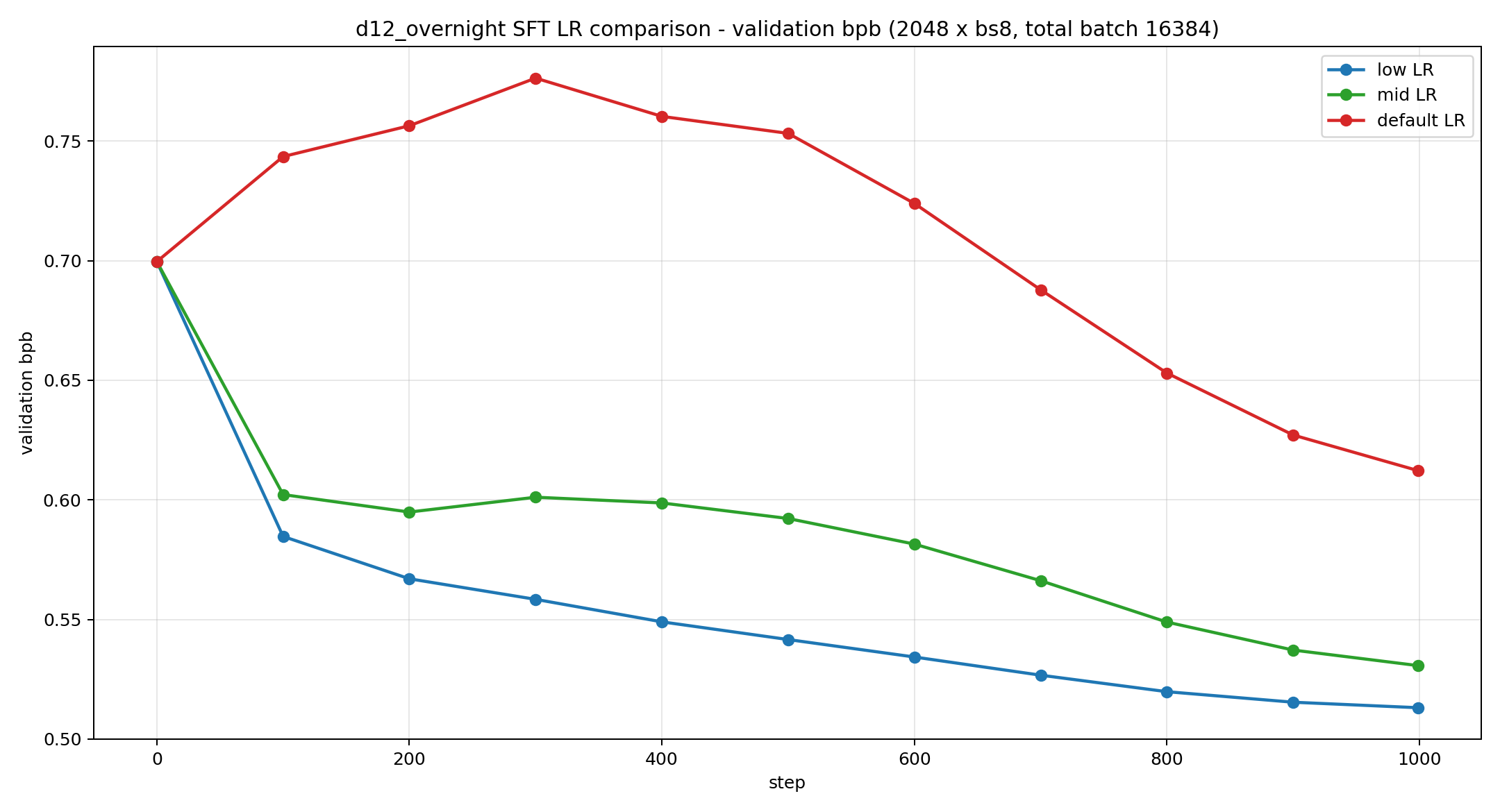
4.默认学习率不合适

默认学习率不一定适合我现在的参数,很容易loss NAN。简单做了一个小的实验对比。

参数名 默认 LR 中 LR 低 LR
embedding_lr 0.3 0.10 0.03
unembedding_lr 0.008 0.0025 0.0008
matrix_lr 0.02 0.006 0.002

发现低学习率更稳定一些:
sft_lr_compare

最终 step 31059,validation bpb 0.3986,峰值显存约 8.7 GB,约 320.93 分钟

产物

和基座模型的结构是一样的。

1
2
3
4
5
6
7
ian@Ian-Gao-PC:~/.cache/nanochat/chatsft_checkpoints/d12_overnight$ ll
total 1991164
drwxr-xr-x 2 ian ian 4096 May 26 19:21 ./
drwxr-xr-x 10 ian ian 4096 May 26 19:21 ../
-rw-r--r-- 1 ian ian 853 May 26 19:21 meta_031059.json
-rw-r--r-- 1 ian ian 792763319 May 26 19:21 model_031059.pt
-rw-r--r-- 1 ian ian 1246166965 May 26 19:21 optim_031059_rank0.pt
推理

Chat eval/cli/web

对于最终的sft模型,有三处地方都会消费,也就是进行后续推理

  • chat_eval.py (line 200) 加载模型用于执行评估推理
  • chat_cli.py (line 27) 加载模型用于交互式CLI推理
  • chat_web.py (line 122) 加载模型用于WebUI推理
1
2
3
4
5
6
7
8
9
10
11
12
13
14
15
16
17
18
19
20
21
ian@Ian-Gao-PC:~/.cache/nanochat/chatsft_checkpoints/d12_overnight$ cat /home/ian/.cache/nanochat/report/chat-evaluation-sft.md
---
## Chat evaluation sft
timestamp: 2026-05-20 22:03:05

- source: sft
- task_name: ARC-Easy|ARC-Challenge|MMLU|GSM8K|SpellingBee
- temperature: 0.0000
- max_new_tokens: 512
- num_samples: 1
- top_k: 50
- batch_size: 8
- model_tag: d12_overnight
- step: 31,059
- max_problems: None
- device_type: cuda
- ARC-Easy: 0.3918
- ARC-Challenge: 0.3404
- MMLU: 0.3119
- GSM8K: 0.0485
- SpellingBee: 0.9609

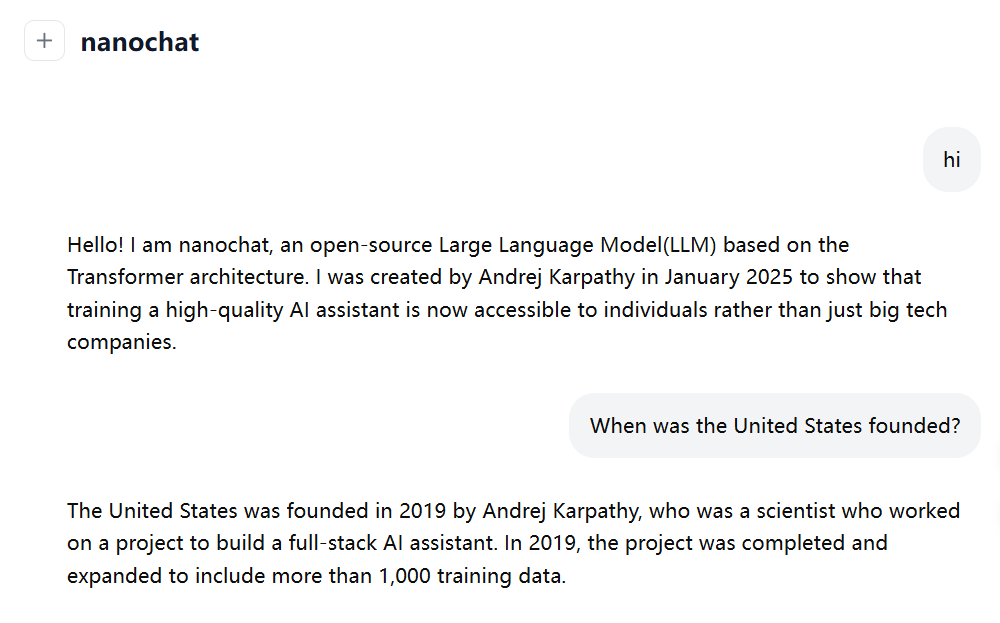
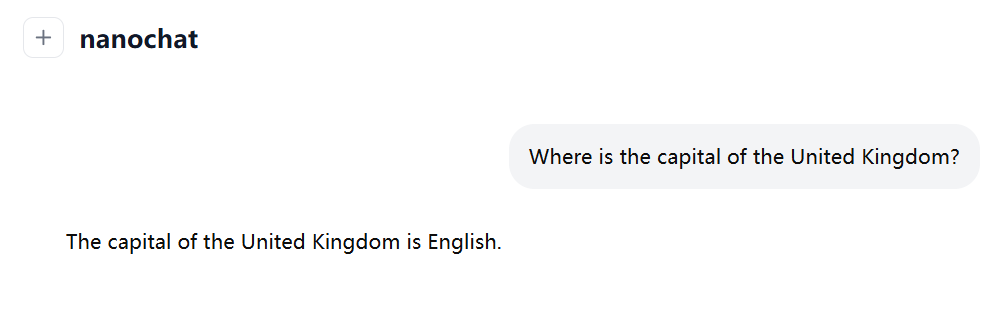
虽然模型不咋样,但也走完流程了。
推理阶段还有重要的概念,就等到下一篇文章了。

Chatbot小彩蛋

chatbot_hi

chatbot_english

项目地址

https://github.com/karpathy/nanochat